
Best CMMS Software in Australia 2026: Top 5 Maintenance Solutions
Top Maintenance Management Solutions 2026
Your complete guide to finding the Best CMMS Software in Australia
Table of Contents
Choosing the best CMMS software in Australia helps maintenance teams manage assets, schedule preventive maintenance, track work orders, and reduce the disruption caused by unexpected equipment breakdowns. For Australian manufacturers, mining operations, facilities managers, and asset-intensive businesses, the right Computerised Maintenance Management System (CMMS) can improve maintenance visibility, standardise workflows, and support better asset management decisions.
The Australian market offers several maintenance management solutions, each suited to different operational requirements. Some focus on mobile work orders and ease of use, while others offer established asset maintenance workflows, configurable maintenance processes, or advanced asset visualisation.
In this guide, we compare five CMMS platforms Fogwing CMMS, MEX CMMS, AssetStack, Pinnacle CMMS, and UpKeep to help Australian businesses evaluate their features, suitability, and maintenance management requirements. We highlight where Fogwing CMMS may be a strong fit for organisations seeking cloud-based maintenance management, mobile work execution, preventive maintenance scheduling, and AI-assisted workflows.
Why Aussie Industries Seriously Need a CMMS
Let’s cut to the chase. Why is this so critical for us down under?
- Tackling the Tyranny of Distance: Our assets are often spread across huge distances. A CMMS gives you a bird’s-eye view of everything, whether it’s in Perth, Parramatta, or Port Douglas.
- Keeping the Team Safe and the Auditors Happy: We’ve got strict Workplace Health and Safety (WHS) laws for a good reason. A CMMS provides a bulletproof record of maintenance, safety checks, and compliance, keeping your team safe and the auditors smiling.
- Getting Smarter with Your Spend: With the cost of labour and parts going up, just reacting to breakdowns will bleed you dry. A CMMS helps you shift to planned, preventive maintenance, saving you a fortune in the long run.
- Doing Your Bit for the Planet and Your Power Bill: Well-maintained equipment runs more efficiently. A CMMS helps you track energy use and reduce waste, which is good for the environment and even better for your power bills.
Top CMMS Software in Australia (2026)
The best CMMS software depends on your asset portfolio, maintenance workflows, mobile requirements, integrations, and budget. The following platforms offer different approaches to maintenance and asset management.
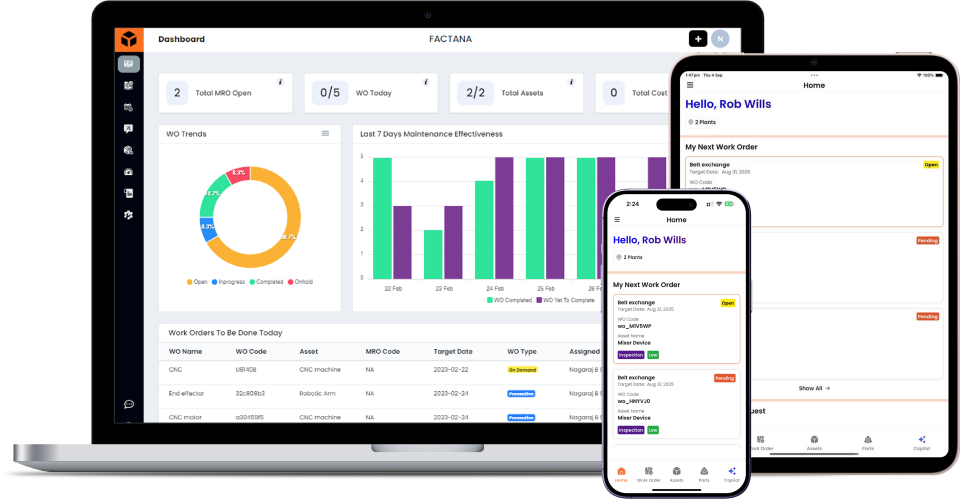
Fogwing CMMS – A cloud-based maintenance management platform with work order management, preventive maintenance scheduling, asset records, mobile workflows, inventory management, reporting, and AI-assisted maintenance capabilities.
MEX CMMS – An Australian-developed maintenance management solution for asset management, preventive maintenance, inventory, and maintenance operations.
AssetStack – Evaluate its asset management and visualisation capabilities against your requirements for asset records, maintenance workflows, and reporting.
Pinnacle CMMS – Consider its maintenance management, configuration, mobile access, and inspection capabilities against your operational needs.
UpKeep – A maintenance management platform known for its mobile-oriented approach to work orders and maintenance workflows.
A Closer Look at the Best CMMS Software in Australia
Alright, let’s dive into the top solutions you’ll find on the market. We’ll go beyond the brochure blurbs to give you a real feel for each one.
1. Fogwing CMMS
Fogwing CMMS is increasingly being recognised as one of the best CMMS software in Australia, especially for teams that want robust maintenance features without unnecessary complexity.
As a cloud-based CMMS, it suits Australian businesses perfectly , there’s no need to manage on-site servers or complex IT setups. Maintenance teams can simply log in, access asset and work order data in real time, and get on with the job.
What It’s Great For:
Businesses looking for a modern, cloud-based maintenance management system that combines work orders, preventive maintenance, asset management, mobile workflows, and AI-assisted capabilities. It is worth considering for organisations that want to digitise maintenance operations without managing complex on-site software infrastructure.
Key Features:
Work Order Management: Create, assign, prioritise, and track maintenance jobs from request to completion. Teams can monitor work progress and maintain organised maintenance records.
Asset Management: Maintain asset information, service history, and maintenance records to help teams understand equipment condition and plan maintenance activities.
Mobile-First Maintenance: Give technicians access to assigned work orders, maintenance checklists, job updates, and other relevant information through mobile workflows.
Preventive Maintenance: Schedule recurring maintenance activities and organise planned work to help reduce reliance on reactive repairs.
AI-Assisted Insights: Use supported AI capabilities to assist with maintenance tasks, checklists, reports, and maintenance decision-making.
Parts and Inventory Management: Track spare parts, manage inventory information, and coordinate material allocation for maintenance work.
Who’s It Best For?
Small and large organisations in manufacturing, facilities management, logistics, and other asset-intensive industries that need scalable maintenance workflows, mobile access, and AI-assisted maintenance capabilities.
2. MEX CMMS
MEX is a true blue Aussie hero in the CMMS world. Being locally developed, they have a deep understanding of what Australian industries need, from specific compliance standards to the challenges of operating in harsh environments.
What It’s Great For:
Australian businesses that need a comprehensive maintenance management system for managing assets, scheduling preventive maintenance, controlling spare parts, and coordinating maintenance activities across multiple sites. MEX is worth considering for organisations that need established maintenance workflows and detailed asset records.
Key Features:
Work Order Management: Create, assign, and track maintenance jobs from request to completion. Keep maintenance tasks organised and monitor progress across teams.
Asset Management: Maintain asset registers, equipment history, documents, and performance information throughout the asset lifecycle.
Preventive Maintenance Scheduling: Schedule maintenance by time or equipment usage, automate work order generation, and organise recurring inspections.
Mobile Maintenance Apps: Allow technicians to access asset information, complete inspections, update work orders, and record equipment readings from the field, including offline workflows.
Inventory Management: Track spare parts, tools, and materials to improve stock visibility and support maintenance planning.
Reporting and Analytics: Use maintenance reports, dashboards, and key performance indicators to review asset performance, maintenance costs, and work order activity.
AI-Assisted Scheduling: Use supported scheduling capabilities to help assign maintenance jobs to appropriate technicians.
Who’s It Best For?
Australian manufacturers, mining operators, fleet managers, facilities teams, and other asset-intensive organisations that need detailed maintenance records, preventive maintenance automation, inventory control, and multi-site visibility.
3. AssetStack
AssetStack is an AI-powered asset intelligence platform focused on improving visibility into asset condition, infrastructure performance, and lifecycle requirements. Its capabilities include asset condition assessments, risk analysis, and data-driven planning. It may be particularly relevant to organisations managing infrastructure, utilities, buildings, and large asset portfolios that need insights to support maintenance and investment decisions.
What It’s Great For:
Organisations managing complex infrastructure, buildings, utilities, and other asset-intensive environments that need better visibility into asset condition, inspection data, maintenance requirements, and long-term asset planning. AssetStack is particularly relevant when asset information is spread across multiple systems and teams need a more connected view of asset health and lifecycle requirements.
Key Features:
Centralised Asset Information: Bring asset registers, condition assessments, inspection records, and maintenance history together to improve visibility across an asset portfolio.
AI-Powered Asset Intelligence: Use AI-supported condition grading, risk analysis, and asset intelligence capabilities to help identify assets that may require attention.
Predictive and Condition-Based Insights: Analyse available asset condition data, sensor information, and degradation trends to support proactive maintenance and asset planning.
Digital Twins and Visualisation: Use digital representations of buildings and infrastructure to help teams understand asset locations, conditions, and maintenance requirements.
Inspection and Defect Management: Organise inspection findings and defect information to support maintenance decisions and follow-up actions.
Maintenance Planning: Use asset condition, criticality, and lifecycle information to help prioritise maintenance activities and future asset investments.
Reporting and Integrations: Connect relevant asset information from existing systems and generate reports that support operational decisions and capital planning.
Who’s It Best For?
Asset-intensive organisations, infrastructure operators, utilities, local councils, and facilities or property portfolio managers that need AI-assisted asset intelligence, condition assessments, digital twins, and data-driven maintenance planning.
4. Pinnacle CMMS
Pinnacle CMMS provides maintenance and facilities management tools for organisations that need to coordinate asset maintenance, work requests, inspections, and compliance records. Its capabilities include preventive maintenance scheduling, asset tracking, spare parts management, and supplier contract administration. It is worth evaluating for facilities teams and organisations responsible for maintaining multiple buildings or physical assets.
What It’s Great For:
Businesses and facilities managers that need a structured way to manage assets, preventive maintenance, work requests, spare parts, supplier contracts, and compliance records. Pinnacle is worth considering for organisations that want to bring maintenance and facilities management activities into a central system.
Key Features:
Asset Management: Maintain asset details, equipment records, and service histories to support ongoing maintenance and asset tracking.
Preventive Maintenance Scheduling: Plan and schedule recurring maintenance activities to help ensure equipment and facilities receive attention at the appropriate time.
Work Request Management: Record maintenance requests and coordinate reactive repairs, helping teams track jobs from reporting through resolution.
Spare Parts and Inventory Control: Manage spare parts and inventory information to help maintenance teams prepare for planned work and repairs.
Supplier and Contract Management: Keep supplier, service contract, insurance, and warranty information organised for easier administration.
Inspections and Compliance Records: Record inspections and maintain relevant audit and compliance information to support maintenance oversight.
Cloud and Integration Options: Evaluate its cloud-based or on-premises deployment options and available integrations with business systems to determine which configuration suits your organisation.
Who’s It Best For?
Facilities managers, property operators, councils, education and healthcare organisations, and businesses managing multiple buildings or a broad range of physical assets that need coordinated maintenance and compliance workflows.
5. UpKeep
UpKeep is a mobile-oriented maintenance management platform that helps teams organise work orders, schedule preventive maintenance, maintain asset records, and manage spare parts. Its mobile workflows enable technicians to record maintenance activities and update job information from the field. It is worth considering for businesses that prioritise technician accessibility, streamlined work execution, and digital maintenance records.
What It’s Great For:
Maintenance teams that want an easy-to-access, mobile-oriented system for managing work orders, preventive maintenance, equipment records, and maintenance requests. UpKeep is worth considering for organisations that want technicians to record and update maintenance activities directly from the field rather than relying on paperwork and desktop entry.
Key Features:
Mobile Work Order Management: Create, assign, update, and close maintenance work orders using a mobile device. Technicians can add job notes, photos, labour time, and parts used.
Preventive Maintenance Scheduling: Organise recurring maintenance tasks and track upcoming work to help keep equipment servicing on schedule.
Asset Management: Access asset records, service history, maintenance documentation, and equipment-related information when planning or completing jobs.
Offline Mobile Access: Access supported work orders and asset information when connectivity is unavailable, then synchronise updates when the device reconnects.
Parts and Inventory Management: Track spare parts and inventory information, helping maintenance teams prepare for jobs and manage materials.
Maintenance Requests and Checklists: Collect maintenance requests, complete inspections, and record task completion using digital workflows.
Analytics and Reporting: Review maintenance activity, asset performance, and operational metrics to help identify opportunities to improve maintenance processes.
Who’s It Best For?
Small and medium-sized businesses, manufacturing plants, facilities teams, and distributed maintenance operations that prioritise mobile work execution, technician adoption, and organised maintenance workflows.
Among all the CMMS platforms evaluated, Fogwing CMMS stands out as the best overall CMMS software in Australia for 2026. It offers the strongest balance of mobile-first usability, AI-driven preventive maintenance, scalability across industries, and ease of adoption for Australian businesses operating across large sites and remote locations.
Key Factors for Choosing the Right CMMS for Your Business
When selecting the best CMMS software in Australia. Choosing a CMMS is like buying a ute , you need to know what you’ll be using it for.
- Is it Easy for Your Team to Use? This is the big one. If your technicians find the software clunky or confusing, they just won’t use it, and your investment is wasted. Look for a clean interface and a great mobile app. Human-centric design is non-negotiable.
- Can it Grow With You? The system you choose today needs to support your business tomorrow. Does it scale easily? Can you add more users, assets, or even sites without a massive headache? A cloud-based solution like Fogwing or Fiix often makes this much simpler.
- How Good is the Mobile Experience? Your maintenance team is on their feet, not chained to a desk. They need to be able to access job details, update work orders, and log parts used right there on the workshop floor or out in the field. A poor mobile app is a deal-breaker.
- What’s the Local Support Like? When something goes wrong at 8 AM in Melbourne, you don’t want to be logging a ticket with a support team in a completely different time zone. Check if they have Australian-based or, at the very least, Asia-Pacific support staff.
- Does it Actually Fit Your Industry? A CMMS for a hospital has different needs than one for a mining company. Look for a provider that understands the specific challenges and compliance requirements of your sector.
- What’s the Real Cost? Don’t just look at the subscription fee. Ask about implementation costs, training fees, and charges for extra users or features. You want to understand the Total Cost of Ownership (TCO) to avoid any nasty surprises.
To know more check out this detailed guide: How to choose the best cmms ?
The Future of CMMS in Australia: What's on the Horizon?
The world of maintenance is getting smarter, and CMMS software is leading the charge. Here’s what’s coming next:
- Smarter Than Your Average Spanner: Artificial Intelligence (AI) in maintenance software will move from being a buzzword to a standard feature, predicting equipment failures with incredible accuracy.
- Giving Your Machines a Voice: More integration with Internet of Things (IoT) sensors will mean your equipment can tell you when it needs attention, long before it breaks down.
- Maintenance on the Move: Augmented Reality (AR) will allow a senior technician in the city to guide a junior tech through a complex repair on a remote site, just by looking through their phone or glasses.
- Greener and Leaner Operations: CMMS will play a huge role in sustainability, helping businesses track and minimise their energy consumption, waste, and carbon footprint.
The Wrap-Up
At the end of the day, choosing the best CMMS software is a massive strategic move for any Australian business. It’s about more than just logging jobs; it’s about making your entire operation safer, more efficient, and ready for the future.
Take your time to assess your needs, talk to your team on the ground, and get a few demos. While there are several strong options, a solution like Fogwing CMMS is a great place to start your search. Its combination of user-friendliness, powerful AI features, and proven global reliability makes it a top contender to get your maintenance strategy sorted.
FAQs
1. What is the best CMMS software in Australia in 2026?
The best CMMS software depends on your maintenance requirements, asset portfolio, team size, integrations, and budget. Fogwing CMMS, MEX CMMS, AssetStack, Pinnacle CMMS, and UpKeep are options to evaluate. Fogwing CMMS is worth considering for organisations seeking cloud-based maintenance management with work orders, preventive maintenance, mobile workflows, inventory management, reporting, and AI-assisted capabilities.
2. Is Fogwing CMMS suitable for Australian manufacturing businesses?
Fogwing CMMS is designed to support maintenance workflows such as asset management, work order tracking, preventive maintenance scheduling, parts management, and maintenance reporting. Manufacturing businesses should assess its suitability against their equipment types, production environment, site requirements, and integration needs.
3. What features should I look for in CMMS software?
Look for work order management, preventive maintenance scheduling, asset history, mobile access, spare-parts management, reporting, user permissions, integrations, and support for your maintenance workflows. AI and IoT capabilities may also be valuable if they address specific operational requirements.
4. What is the difference between CMMS and maintenance management software?
CMMS stands for Computerised Maintenance Management System. It is a type of maintenance management software used to organise assets, maintenance requests, work orders, preventive maintenance, spare parts, and maintenance records. The exact capabilities vary by platform.
5. How much does CMMS software cost in Australia?
CMMS pricing varies according to the vendor, subscription plan, number of users or assets, deployment model, implementation, integrations, and support. Request current quotes from shortlisted providers and compare the total cost of ownership rather than relying on subscription prices alone.
6. How do I choose the right CMMS for my Australian business?
Define your maintenance requirements, shortlist suitable platforms, verify mobile and preventive maintenance capabilities, test the software with your technicians, confirm integration and support arrangements, and compare total costs. A product demonstration or trial can help you determine whether the platform fits your operational workflows.