Maintenance Operations are challenging today due to the growing demand for high machinery usage and cost reductions. Efficiently maintaining assets, equipment, and facilities is crucial for organizations of all sizes.
In this situation, you will fail if you follow the traditional approach of managing maintenance tasks using paper-based ledgers, whiteboards, or Excel spreadsheets. You need Computerized Maintenance Management Systems (CMMS), which are pivotal in streamlining maintenance operations, prolonging asset lifespan, and reducing downtime.
Traditionally, CMMS solutions required upfront investment in software licensing, computing hardware purchase, application customization, and longer implementation.
However, the emergence of free CMMS software on the Cloud has democratized access to these powerful tools, enabling businesses to enhance maintenance processes without high capital investment.
What are the Key Features of CMMS Software
Free CMMS software offers many features to kick off digitized maintenance operations and improve asset management. Let’s delve into some of the key features commonly found in the best CMMS:
Asset Management:
Effective asset management is the backbone of any CMMS software. The maintenance team can effortlessly catalog and track their assets with free CMMS software, including equipment, machinery, vehicles, and facilities.
Each asset’s vital information, such as serial numbers, purchase dates, warranty details, and maintenance history, can be easily recorded and accessed. This feature aids in better resource allocation, proactive maintenance scheduling, and informed decision-making.
Work Order Management:
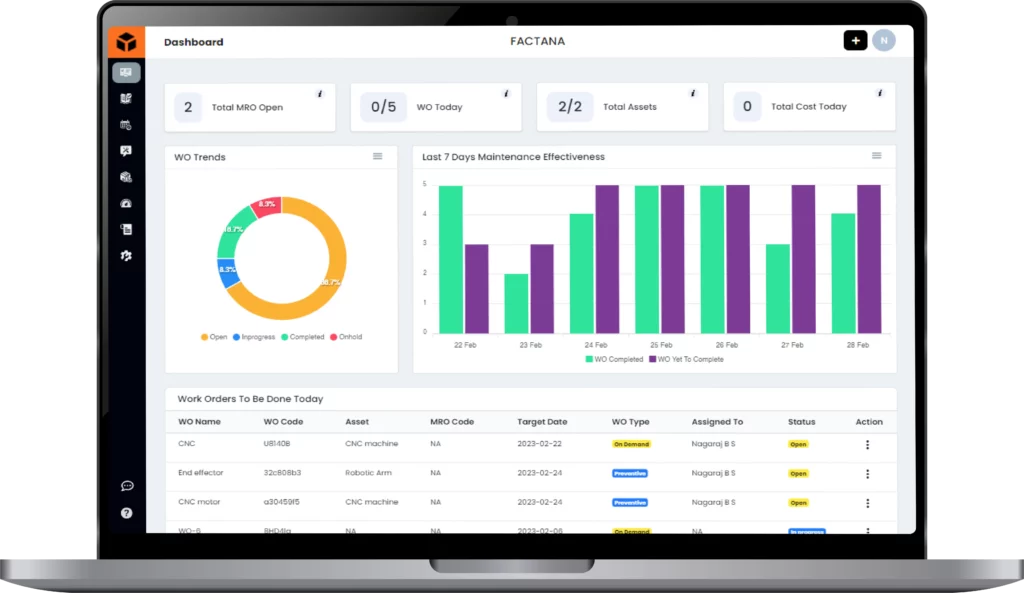
Work order creation, assignment, and tracking are the foundational features provided by Free CMMS software. The maintenance manager can generate work orders as on-demand, preventive, or inspection type, ensuring timely inspections and repairs.
Assigning tasks to technicians becomes more efficient with automated notifications and reminders, reducing response times and minimizing downtime. Additionally, technicians can update work order statuses in real-time, providing managers instant visibility into ongoing maintenance activities.
Preventive Maintenance Scheduling:
Preventive maintenance is critical for preventing unexpected breakdowns and prolonging asset lifespan. Free CMMS software offers scheduling capabilities, allowing maintenance users to create maintenance schedules based on predefined criteria such as time, usage, or condition-based triggers.
Organizations can proactively address potential issues before they escalate to minimize equipment downtime, optimize performance, and reduce repair costs.
Inventory Management:
Managing asset spare parts, reservations, and inventory levels management features to effectively digitize the maintenance operations properly. Many Free CMMS software providers provide parts management, in which users can track stock levels in real-time, set reorder points, and receive alerts when inventory levels run low. This ensures that maintenance teams can access the necessary resources to complete tasks, minimizing disruptions and delays promptly.
Mobile Access:
In today’s mobile-centric world, having access to CMMS functionality on the go is essential for field technicians and maintenance personnel. Many free CMMS software’s typically offer mobile applications that enable users to view work orders, update task statuses, and access asset information from anywhere. This mobile accessibility enhances collaboration, improves responsiveness, and empowers teams to address maintenance issues promptly.
User-Friendly Interface:
Maintenance user adoption is key to the success of any CMMS software implementation. Free CMMS software prioritizes usability, offering intuitive interfaces and navigation that require minimal training. From technicians on the shop floor to maintenance managers in the office, users can easily access the features they need to perform their roles effectively, driving greater productivity and efficiency across the organization.
To learn more in detail, check out this page: Key Features of CMMS
Leading Free CMMS Software Providers
Here’s a quick overview of the seven free CMMS tools covered in this guide:
- Fogwing CMMS – Lifetime free plan with unlimited assets, work orders, PMs, and users, plus IoT and AI support.
- Fiix CMMS – Free tier for small teams with essential asset and work order management.
- UpKeep – Basic free plan for work orders, assets, and mobile access.
- MaintainX – Free version focused on work orders and tasks with a mobile-first approach.
- Limble CMMS – Limited free plan covering basic PMs, assets, and simple reporting.
- Hippo CMMS – Simple free plan for single users with basic scheduling and work orders.
- eMaint X3 – Free version supporting up to 50 assets with core maintenance features.
This quick list helps readers compare the options at a glance before diving into the full descriptions and comparison table.
Top 7 Free CMMS Software Available in the Market
Fogwing CMMS:
Fogwing CMMS offers FREE CMMS for any organization to start using it without providing any purchase or credit card information. Fogwing CMSS Smart CMMS offers everything listed above and beyond as FREE. You can add unlimited Assets, Work Orders, Preventive Maintenance Schedules, and Parts. There is no trial period, so you can use Fogwing CMMS as a lifetime free CMMS software.
Pros
- Lifetime free plan with no limits on assets, work orders, or users
- Includes PM scheduling, work orders, inventory, multi-site support, and checklists
- Built-in IoT integration for condition monitoring
- Generative AI for inspection checklists and maintenance summary reports
- Strong mobile app and cloud hosting
- Suitable for both small teams and multi-plant operations
Cons
- Predictive insights require IoT deployment
- API integrations may require a paid plan
Fiix:
Fiix offers a free version of its CMMS software tailored for small maintenance teams. It includes work order management, asset tracking, and basic reporting.
Pros
- Simple, user-friendly interface
- Good for small teams starting with digital maintenance
- Reliable asset management and basic reporting
- Well-documented and supported platform
Cons
- Free plan limits preventive maintenance and advanced features
- Inventory management is basic
- Mobile features limited in the free version
- Growing teams may need to upgrade early
UpKeep:
UpKeep’s free plan provides essential maintenance management capabilities, including work order creation, asset tracking, and mobile accessibility. It’s suitable for small businesses and startups.
Pros
- Strong mobile-first experience
- Easy work order and asset creation
- Clean and intuitive user interface
- Suitable for small teams with basic maintenance needs
Cons
- Free plan has limited asset and workflow features
- Inventory management and analytics require paid plans
- Not ideal for multi-site operations
- Basic preventive maintenance automation
MaintainX:
MaintainX provides a free version of its CMMS software tailored for small teams. It includes work order creation, task management, and mobile accessibility.
Pros
- Excellent checklist and inspection workflows
- Highly mobile-friendly for frontline teams
- Simple work order management
- Good fit for small field teams
Cons
- Limited automation in preventive maintenance
- Advanced features are locked behind paid plans
- Minimal reporting in the free version
- Single-site usage in the basic tier
Limble CMMS:
Limble CMMS offers a free plan with limited features, including preventive maintenance scheduling, asset management, and basic reporting.
Pros
- Clean and modern interface
- Strong PM scheduling tools
- Good customer support and onboarding experience
- Reliable for essential maintenance needs
Cons
- The free plan is very restricted across assets, PMs, and sites
- Inventory and workflow automation require paid upgrades
- No IoT or predictive features
- Users tend to outgrow the free version quickly
Hippo CMMS:
Hippo CMMS provides a free version of its software designed for single users or small teams. It includes work order management, asset tracking, and maintenance scheduling.
Pros
- Simple interface suitable for beginners
- Basic asset tracking and work order capabilities
- Good for very small or single-user teams
Cons
- The free plan is mostly limited to one user
- No inventory module
- Limited PM scheduling
- No analytics, reporting, or automation tools
- Not suitable for growing teams
eMaint CMMS:
eMaint X3 CMMS offers a free version of its software for up to 50 assets. It includes basic maintenance management features such as work order creation, asset tracking, and reporting.
Pros
- Established enterprise CMMS vendor
- Good introductory option to test the platform
- Covers essential asset and work order functions
Cons
- Free plan limited to 50 assets
- No inventory management in free tier
- Minimal reporting
- No mobile features in the free version
- Not intended for long-term free use
These free CMMS options offer varying levels of functionality and are suitable for different business sizes and requirements. It is highly recommended that you explore the pros and cons of each platform and choose the most suitable one for your maintenance operations.
Quick Comparison Table: Free CMMS Software
| Feature / Capability | Fogwing CMMS | Fiix CMMS | UpKeep | MaintainX | Limble CMMS | Hippo CMMS | eMaint X3 |
| Asset Management / Asset Register | Unlimited assets | Unlimited assets | Asset limits apply | Basic asset management only | Limited assets in the free plan | Mostly single-user basic tracking | Max 50 assets |
| Work Order Management (Create / Assign / Track) | Full WOs | Included | Included | Included | Included | Basic only | Limited in free |
| Preventive Maintenance (PM) Scheduling | Included | Up to 25 PMs | Basic PM only | Recurrence is limited in free | Limited PM automation | Very basic PMs | Restricted PMs |
| Inventory / Spare Parts Management | Included | Basic | Limited or paid | Not included in free | Limited in free | Not included | Not included |
| Mobile App Access | Full mobile app | Included | Strong mobile support | Best for mobile tasks | Limited assets in the free plan | Basic | Basic |
| Team Collaboration / Users | Unlimited users | Limited | Limited | Limited | Limited | Single user free | Limited |
| Checklists / Inspections | Included | Basic | Basic | Strong checklist support | Limited automation | Basic | Very basic |
| Reports & Analytics | AI-assisted reports | Basic analytics | Basic | Very limited | Limited in free | No reporting | Basic |
| Locations / Multiple Sites | Multi-site included | Limited | Limited | Single site | Paid feature | Single site | Single site |
| IoT / Predictive Insights | Built-in IoT integration | Not available for free | Not available | No IoT features | None | None | None |
| Cloud Hosting & Security | Included | Included | Included | Included | Included | Basic | Basic |
| Free Plan Duration | Lifetime free | Ongoing free tier | Free with limits | Free basic plan | Limited free tier | Trial-like version | Good, but some features are locked |
How to Choose the Best CMMS Software
With many available CMMS options, understanding the essential buying principles is crucial to making an informed decision that aligns with your organization’s needs and goals.
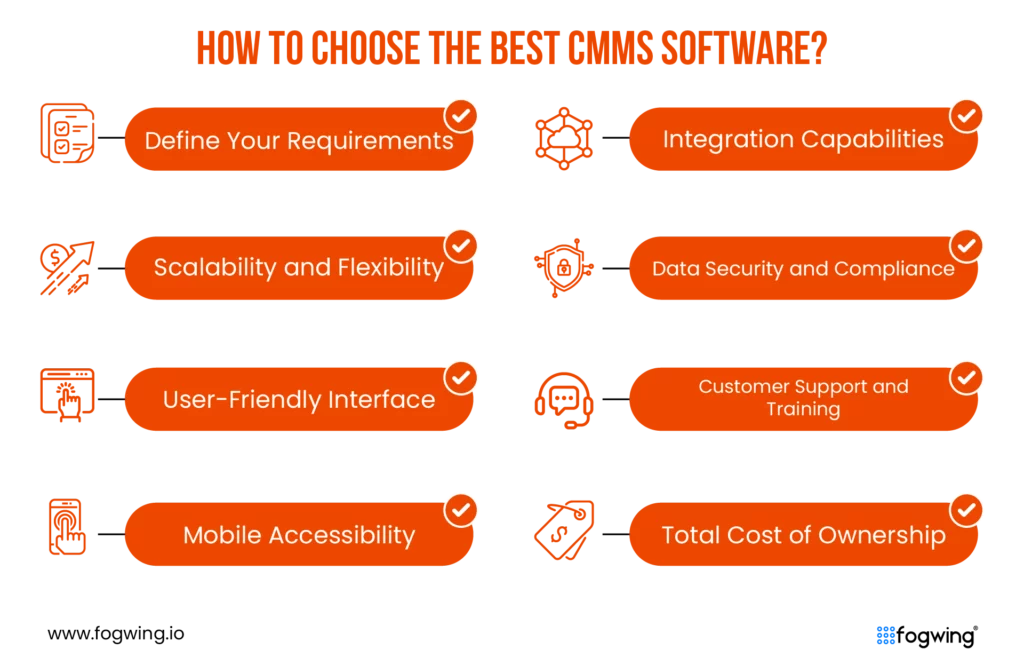
1. Define Your Maintenance Needs
Identify what problems you need to solve: asset tracking, PM scheduling, inventory, compliance, or multi-site management. Align requirements across teams before choosing a tool.
2. Check Scalability
Pick a CMMS that can grow with your operations. Look for multi-site support, unlimited users, flexible workflows, and the ability to add modules as needed.
3. Focus on User Experience
A CMMS is only effective if your team actually uses it. Choose an intuitive interface with minimal training requirements and smooth onboarding.
4. Prioritise Mobile Access
Technicians should be able to view, update, and complete work orders from anywhere. Strong mobile capability improves response time and reduces downtime.
5. Look for Integrations
Your CMMS should connect easily with ERP, inventory systems, IoT sensors, and other tools. Integrations reduce manual work and create better visibility.
6. Ensure Data Security
Choose a vendor with strong security standards encrypted data, role-based access, backups, and compliance with industry regulations.
7. Evaluate Support
Good customer support matters. Check whether the vendor offers documentation, training, email/chat support, or guided onboarding.
8. Understand Total Cost
Review all ongoing costs—subscription, training, integrations, add-ons, or storage limits. Choose a solution that delivers value without hidden expenses.
Why Fogwing CMMS Stands Out Among Free CMMS Platforms
Fogwing Smart CMMS stands out from the CMMS providers crowd in two aspects. This CMMS software provides every functionality required to end multi-plant manufacturing maintenance operations within a single application.
Some of the key different features are here:
1. Multiple Plants and Shift-based Maintenance
2. SLA Policy Enforcement
3. Asset Categorization at the Plant Level
4. Outsourced Maintenance Operations
5. Vendor Management with Contract Tracking
6. Generative AI Assistance for Inspection Checklist
7. Generative AI Assistance for Maintenance Summary Report
8. IoT for Asset Condition Monitoring
9. Predictable Maintenance Operations
10. and Chatbot with Generative AI Assistance.
Don’t just take our word for it – experience fogwing CMMS firsthand. We encourage you to use our cloud-based CMMS in a manner that mirrors your company’s operations. This includes creating and managing assets, scheduling and monitoring work orders and procedures, and utilizing real-time reporting and analysis features.
Invite your team to test Fogwing CMMS on their mobile devices and share their feedback on the experience. Once you’re convinced, feel free to explore our pricing options.
Conclusion:
In conclusion, free CMMS software has democratized access to powerful maintenance management tools, enabling businesses of all sizes to optimize their maintenance operations without the financial barriers associated with traditional CMMS solutions.
By leveraging features such as asset management, work order management, preventive maintenance scheduling, inventory management, reporting and analytics, mobile accessibility, and user-friendly interfaces, organizations can enhance asset reliability, minimize downtime, and drive overall operational excellence. Embracing the best CMMS software empowers businesses to unlock efficiency, improve resource utilization, and stay competitive in today’s rapidly evolving marketplace.
FAQs
1. What is CMMS software, and why is it important for modern maintenance management?
Computerized Maintenance Management System (CMMS) software is a digital solution designed to streamline maintenance operations by automating work orders, scheduling preventive tasks, and tracking assets. CMMS is essential for improving equipment uptime, reducing operational costs, and enhancing industry maintenance efficiency.
2. How does free CMMS software benefit small and medium-sized businesses (SMBs)?
Free CMMS software provides SMBs with essential tools- asset tracking, work order management, and preventive maintenance scheduling—without high upfront costs. It democratizes access to maintenance digitization, allowing smaller companies to improve operational efficiency and reduce downtime.
3. What are the core features to look for in a cloud-based CMMS solution?
A robust cloud-based CMMS should offer:
- Asset and equipment management
- Work order scheduling and tracking
- Preventive maintenance planning
- Spare parts and inventory management
- Mobile access for field technicians
- Real-time reporting and analytics
- Role-based access and security compliance
These features help ensure scalable and cost-effective maintenance operations.
4. Why is mobile accessibility important in CMMS software?
Mobile-friendly CMMS solutions empower field technicians to view work orders, update task statuses, and access asset data from anywhere. This real-time accessibility enhances response times, improves collaboration, and minimizes machine downtime.
5. Which is the top free CMMS software available today?
Top free CMMS platforms include:
- Fogwing Smart CMMS
- Fiix
- UpKeep
- MaintainX
- Limble CMMS
- Hippo CMMS
- eMaint X3